Includes minor database schema changes, preventing 8.2 clients from connecting to an 8.3 server.
Visure Requirements 8.2
Not compatible with Visure Requirements 8.1.
Contains small schema updates that prevent 8.1 clients from connecting to an 8.2 server.
Visure Requirements 8.1
Fully compatible with Visure Requirements 8.0.
No schema changes; 8.0 clients can connect to an 8.1 server, though new features (e.g., modified since last baseline) won’t be available.
Visure Requirements 7.2 and older
These versions use an outdated schema and require a database migration before upgrading.
Once migrated, 7.2 and older clients will no longer be able to access the database.
What’s New in Visure Requirements 8.3
General Enhancements
User-Named Licenses
Visure 8.3 introduces User-Named Licenses, enabling organizations to assign licenses directly to specific users rather than relying on concurrent licensing. This new model:
Improves license allocation and auditability
Prevents access conflicts in multi-user environments
Offers clearer usage visibility for compliance and planning
Ensures predictable access for distributed or remote teams
Technology Upgrades
Version 8.3 includes major updates across core technologies:
gRPC 1.71.0
Angular 16
.NET 8
Python 3.12
These upgrades enhance performance, security, maintainability, and integration capabilities, while delivering improved stability and responsiveness.
Visure Authoring Enhancements
Usability Improvements
Visure 8.3 focuses heavily on improving user experience and productivity with several UI and interaction upgrades:
New UI
A fully refreshed, more modern interface with consistent colors, components, and behaviors across all modules, providing a more intuitive and cohesive experience.
New List View Filters
Enhanced Excel-like filtering allows users to quickly sift through data using familiar spreadsheet-style interactions.
Multitab Functionality
Users can work across multiple documents/tabs simultaneously, improving productivity and simplifying multitasking.
Enhanced Dashboards
Faster performance, new widgets, and improved navigation enable users to access and analyze key project metrics more efficiently.
Improved Properties Panel
New features include:
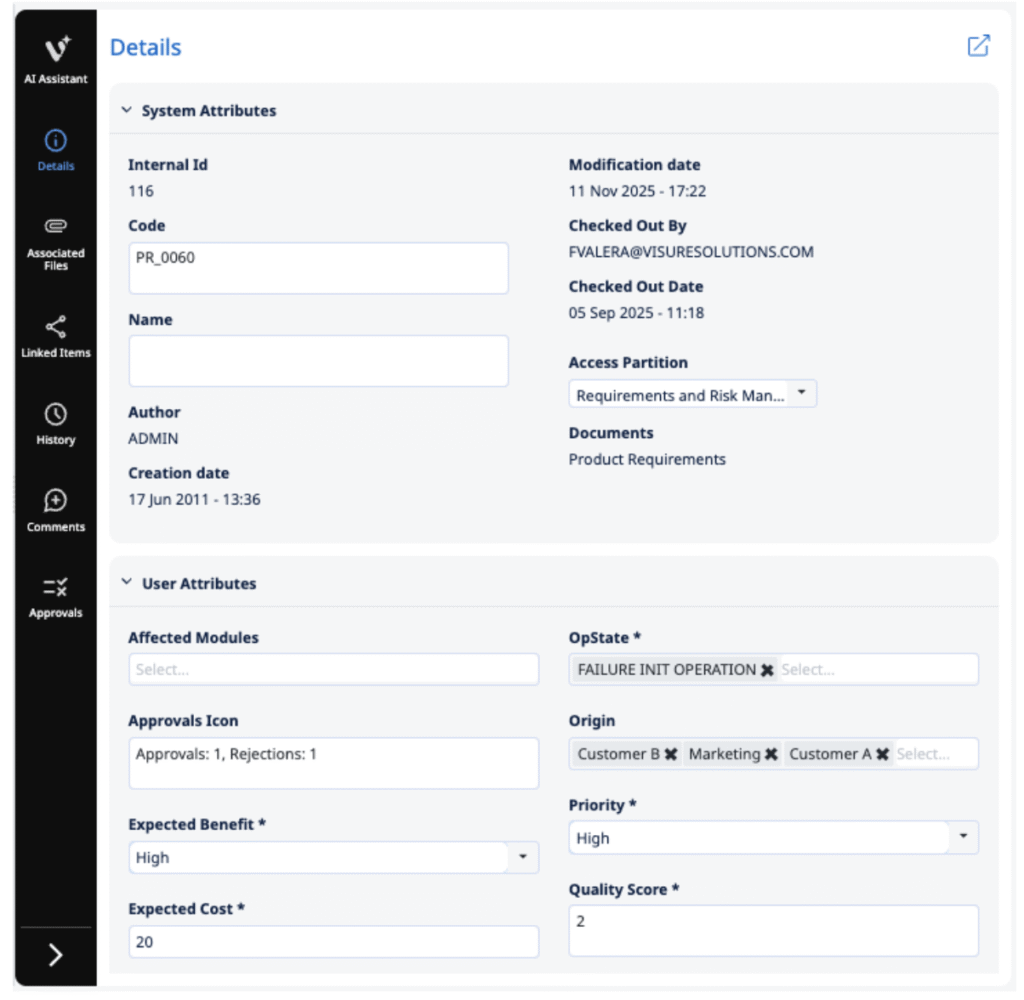
A Documents field showing which documents an item belongs to
Asterisks marking mandatory attributes
These additions improve traceability and help ensure data completeness.
Streamlined Baseline Combo
Users now see only baselines related to the current document, reducing clutter and simplifying selection.
German Language Support
Full German UI translation enhances collaboration for international teams.
Email-Based Password Reset
When email configuration is enabled, users can reset passwords and onboard new accounts directly via email.
Maximize Description Icon
Users can now expand the description editor to full screen for improved focus when authoring complex content.
Import from Word
Visure 8.3 introduces a new intelligent import engine for MS Word and Google Docs. Key features include:
Support for regular expressions to detect items by code
Automatic detection of requirements using natural-language cues (e.g., “shall”)
Recognition of structured XML labels for accurate attribute mapping
Style-based import (Heading, Normal, etc.)
Support for importing items inside tables:
One item per row
One item per table (ideal for risk tables, procedures, protocol documents)
Import from Excel
Excel import now provides a more powerful and synchronized workflow:
Import individual tabs independently
Detect and synchronize deleted items
Update traceability based on changes within the Excel document
Improved full synchronization for large datasets
ReqIF Import & Export
Enhanced ReqIF support ensures seamless interoperability with external tools. Improvements include:
Better preservation of hierarchy, attributes, and formatting
More robust traceability transfer
Smooth collaboration with customers, suppliers, and partners using ReqIF-compliant systems
Export to Word
The new Word export engine allows full customization for standards-based documentation, especially for regulated industries. Enhancements include:
Export attributes at the same line level as the item code
Sorting rules for attributes
Options to export code, name, and description for related items
Support for system attributes and custom attribute styles
Greater control over compliance-oriented output formatting
Export to Excel
Excel export now runs in the background on the server, allowing users to continue working while the export completes. All attributes and relationships are captured with higher efficiency and speed.
Traceability Matrix
Major enhancements include:
Support for additional system attributes: Status Indicator, Parent Item, Documents, Internal ID, Level, Author, Creation Date, Access Partition, Modification Date, Project, Check-Out By
Attribute sorting directly in the matrix
RVTM-compliant export options
Ability to export code, name, and description into separate columns
Administrators can monitor active users, license usage, expiration dates, and terminate sessions when needed.
User-Named License Management
Admins can assign licenses to specific users, improving control and preventing access conflicts.
Centralized Templates
All project templates are now managed from a unified configuration area, simplifying consistency across projects.
Repository Data Model
Admins can define and manage inter-project relationship models for clearer visibility across multiple repositories.
Email Configuration Panel
Easy setup for SMTP settings, sender details, and message templates, no external configuration required.
Additional Admin Settings
Includes new options for link restrictions, hierarchy rules, and global parameters to tailor projects to organizational or regulatory needs.
Visure Desktop Enhancements
Performance
Faster document loading with background description loading allows users to start working immediately while content continues to populate.
Global Parameters for Documents
Now supports referencing both items and documents, enabling more flexible parameter-based content authoring.
Export to Word
Desktop export now includes additional formatting and attribute-level customization, mirroring Authoring capabilities.
Import from Excel
Users can dynamically add missing attributes during mapping for smoother, uninterrupted import processes.
System Trusted Certificates
Visure Desktop now supports:
Certificates from System Trusted Store
Automatic renewal via Azure Key Vault for CA-issued certificates
GPO distribution for self-signed certificates across domains
Visure Server Enhancements
Restricted Remote Server Settings
A new Restricted Mode allows authorized users to upload/download Python scripts and log files through the Remote Server Settings tool, without requiring full server admin access. This improves operational security while maintaining flexibility for debugging and customization.