- Visure × Autodesk Fusion Manage (PLM)
One Digital Thread Connecting ALM and PLM
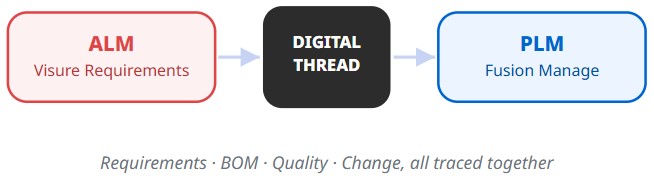
Multidisciplinary Requirements linked to Fusion Manage items, kept in sync automatically, on a schedule, or on demand.
The Challenge
ALM and PLM Still Live in Silos
Requirements and PLM Live in Silos
Hardware and Software, Different Clocks
No Centralized Digital Thread
Slower Time to Market
See It Live
Watch the Integration in Action
Learn how Visure and Autodesk Fusion Manage sync in real time.
ALM-PLM Integration Benefits
See the Integration in Action
Six ways this integration synchronizes cyber-physical systems.
01 · AI-Assisted Traceability
AI helps keep every requirement traced to its PLM record.
- AI Coverage Checks. AI flags requirements that look unlinked or under-covered, so nothing slips through.
- Field-Level Traceability. See exactly which system, Visure or Fusion Manage, is the source of truth for each field.


02 · AI-Powered Change Impact
AI flags exactly what a change affects, every time.
- AI Impact Analysis. AI reviews each change and surfaces the requirements and items it actually affects.
- Nothing Silent. Every requirement gets a result, created, updated, unchanged, skipped, or failed.

03 · BOM Management
One BOM, always linked to the requirement behind it.
- Real-Time Editing. Multiple engineers update BOM data simultaneously, no conflicts.
- Requirement-Linked BOM Lines. Every part traces back to the requirement that specified it.
04 · Quality Management
Quality records that trace back to the spec.
- NCR & CAPA Traceability. Non-conformances trace straight back to the originating requirement.
- FMEA Linked to Requirements. Failure modes connect to the requirements and components they affect.
05 · AI-Generated PRD
Let AI draft the PRD, your team refines it.
- AI-Drafted Requirements. Turn raw notes into a structured PRD in minutes, not days.
- Human-Reviewed Before Baseline. Every AI draft is reviewed and approved before it ships.
06 · Simplified Onboarding
Five steps, and you're syncing both ways.
A guided wizard connects Visure and Fusion Manage. Just pick your fields, set your sync direction, and you’re live. No scripts, no manual field mapping.
1
Setup & Direction

3
Mapping & Sync

- Setup & Direction. Pick the Visure document and Fusion Manage Requirement Specification to connect, then choose which way sync flows.
- Fields to Map. Select exactly which Visure requirement fields should sync to Fusion Manage.
- Mapping & Sync. Map each Visure field to its Fusion Manage counterpart and set the sync mode: Manual, Automatic, or Scheduled.
- Reverse Fields (Optional). Select which Fusion Manage fields should sync back to Visure.
- Reverse Mapping & Sync (Optional). Map Fusion Manage fields back to Visure and configure reverse sync, so updates flow both ways.
Governance
Governed Access, Full Audit Trail
Permissions and process stay consistent across both systems and every engineering discipline.
- AI-assisted authoring and impact analysis. AI flags ambiguous or untestable requirements and maps downstream impact before you accept a change.
- Bi-directional traceability. Requirements, risk, design, code, and test evidence connected in one chain, with coverage gaps flagged automatically.
- Automated governance and reporting. Generate certification-ready compliance packages on demand from your live baseline, not a manual rebuild.
- Configuration and baseline automation. Snapshot verified states and reuse requirement catalogs across programs and standards.
Consumer Electronics
- IEC 62368-1
- RoHS
- IEC 60335-1
Get the ALM-PLM Integration Datasheet
Get started with Visure
Ensure End-to-End Traceability
Get Started with Autodesk Fusion Manage
Your PLM, Connected to Every Requirement

Visure + Autodesk Fusion Manage
Frequently Asked Questions
Can’t find an answer? Contact our team →
ALM manages requirements and software. PLM manages hardware, BOMs, and product data. Most products need both.
Autodesk Fusion Manage is a standalone cloud Product Lifecycle Management (PLM) platform for managing business processes, quality control, and workflows across an entire company.
Faster time to market, fewer rework cycles, and one source of truth across requirements, hardware, and quality.
Each requirement in Visure links to a Fusion Manage item, with its hierarchy and relationships carried over as structure and traceability links.
Each Visure document maps to a Fusion Manage Requirement Specification. You choose how each direction syncs, automatically as changes happen, on a set schedule, or manually with one click, and every run reports exactly what changed.
Fusion Manage manages BOM and quality (NCR, CAPA, FMEA) natively. Once a requirement syncs in as an item, it's available to those processes inside Fusion Manage.
Fusion Manage is cloud-native. Visure can run in the cloud or on-premise, whichever your program requires.
Get Started
Ready to Connect ALM and PLM?
Talk to Our Team
By submitting you agree to Visure’s Privacy Policy.
- 14-Day Trial
- Cancel Anytime
- All Features Included